

Tavo
Tavo adds FreeTheAI as a Custom (OpenAI Protocol) API connection. Use the base URL ending in /v1 and a model ID from the models page.
Category: Roleplay apps. Before you start, you need a FreeTheAI account, an API key, and today's check-in.
Settings
| Setting | Value |
|---|---|
| Model Platform | Custom (OpenAI Protocol) |
| API Base URL | https://api.freetheai.org/v1 |
| API Key | Your FreeTheAI key (ftai_..., 53 characters) |
| Model Name | fta/zai/glm-5.3 |
Steps
Open API Connection
Open the menu and tap API Connection, then Add New.
Choose the platform
Set Model Platform to Custom (OpenAI Protocol).
Enter your details
Paste your key, the API Base URL ending in /v1 (not /chat/completions), and a model name. Tap Save.
Make it the default
Open the menu next to the new connection and set it as the default, then start a chat.
Tips
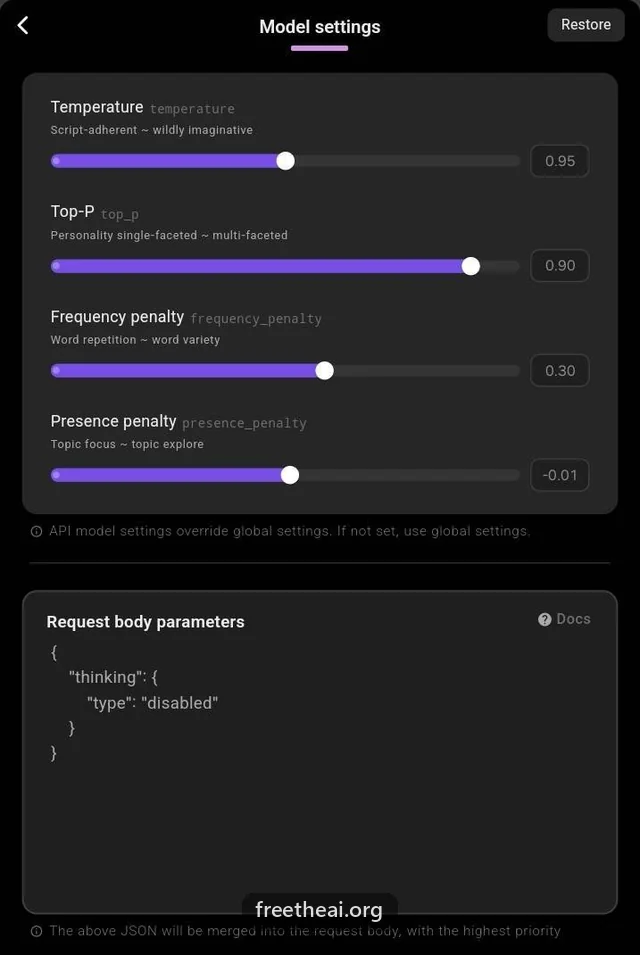
- Adjust temperature and reply length under Parameter Settings on the connection page.
- To turn off a model's thinking, turn on "Turn thinking off" for your key on the API keys page (scope & settings). It works for every model and needs nothing in Tavo. Adding {"thinking": {"type": "disabled"}} under request body parameters also works on some models.
Common questions
Tavo cannot connect. What should I check?
The base URL must be api.freetheai.org/v1, the key must be complete, and you must have checked in today at freetheai.org/checkin.
More help
How this guide was checked
Checked against Tavo's help center (Custom OpenAI Protocol guide) on 2026-09-29.