

SillyTavern
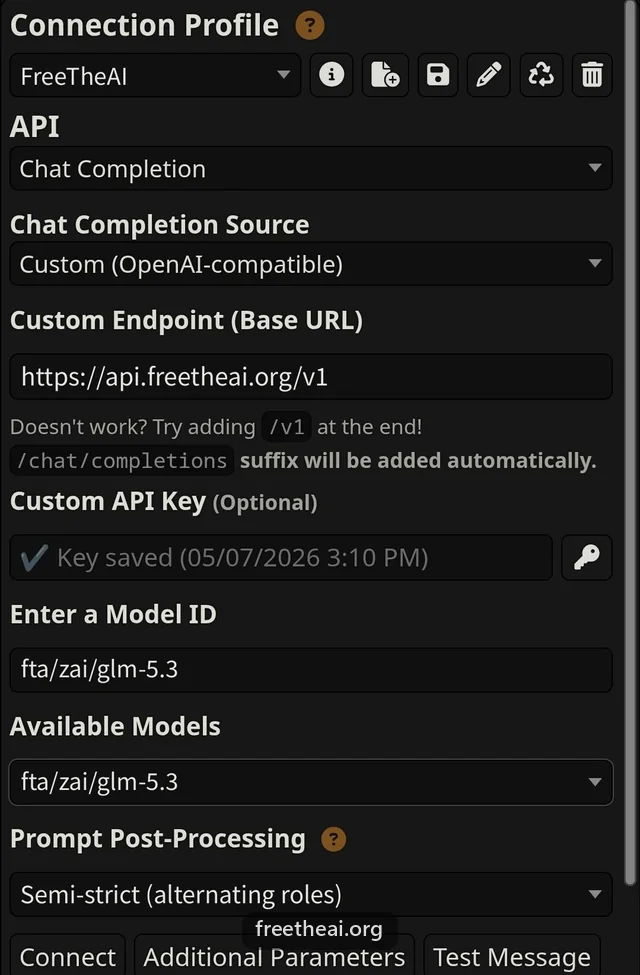
SillyTavern talks to FreeTheAI through its Chat Completion API with the Custom (OpenAI-compatible) source. It lists every model your key can use.
Category: Roleplay apps. Before you start, you need a FreeTheAI account, an API key, and today's check-in.
Settings
| Setting | Value |
|---|---|
| API | Chat Completion |
| Chat Completion Source | Custom (OpenAI-compatible) |
| Custom Endpoint (Base URL) | https://api.freetheai.org/v1 |
| Custom API Key | Your FreeTheAI key (ftai_..., 53 characters) |
| Model ID | fta/zai/glm-5.3 |
| Prompt Post-Processing | Semi-strict (alternating roles) |
Steps
Open API Connections
Click the plug icon in the top bar.
Choose the source
Set API to Chat Completion and Chat Completion Source to Custom (OpenAI-compatible).
Enter the endpoint and key
Paste the base URL into Custom Endpoint (Base URL). SillyTavern adds /chat/completions itself, so do not add it. Paste your key into Custom API Key.
Pick a model and connect
Type a model ID into Enter a Model ID, or pick one from Available Models after connecting. Press Connect.
Set Prompt Post-Processing
On the same screen, set Prompt Post-Processing to Semi-strict. With None, some models answer "Bad Request" because the chat can reach them without a message from you.
Tips
- Your key is hidden after you press Connect. Keep a copy somewhere safe.
- If replies stop early, raise Max Response Length in the sampler panel.
- Save the connection as a Connection Profile to switch models quickly.
Common questions
SillyTavern connects but no models appear. What now?
Type the model ID by hand in Enter a Model ID, for example fta/zai/glm-5.3. Also check that you checked in today at freetheai.org/checkin.
Should the base URL end in /v1?
Yes. Use api.freetheai.org/v1. SillyTavern appends /chat/completions.
SillyTavern says "API returned an error: Bad Request". How do I fix it?
Set Prompt Post-Processing to Semi-strict in API Connections and try again. Some models need at least one message from you in every request, and that setting makes sure there is one.
More help
How this guide was checked
Checked against SillyTavern's source (release branch, API connection panel) on 2026-09-29.